
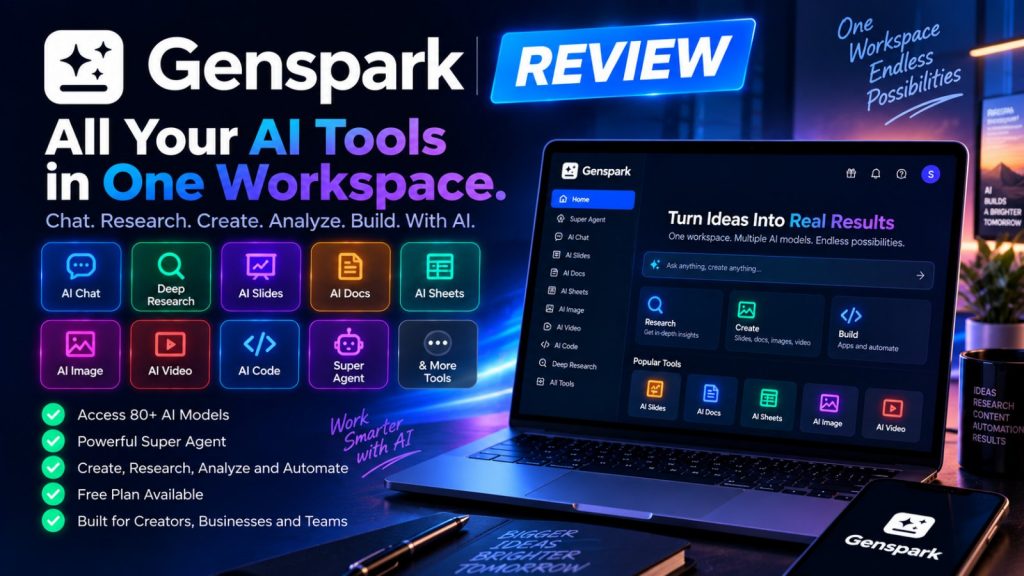
Genspark Review: Is This AI Workspace Worth Using?

AI tools are becoming increasingly specialized.
One platform is used for research. Another creates presentations. A third generates images and video. Then there are separate tools for spreadsheets, documents, coding and automation.
The problem is not necessarily a lack of AI capabilities. It is the number of different tools you have to manage.
Genspark takes a different approach.
Instead of focusing on one specific AI task, it brings multiple AI tools, models and agents into one workspace. The platform combines AI chat, research, presentations, documents, spreadsheets, images, video, coding and autonomous agent workflows.
At the center of the platform is Super Agent, which is designed to take a complex request, break it into steps, select the appropriate tools and work toward a finished result.
That raises an important question:
Can Genspark actually replace several separate AI subscriptions, or does its broad feature set come with too many compromises?
Quick answer: Genspark is worth considering if you want an all-in-one AI workspace for research, content creation, presentations, documents, spreadsheets, images, video and multi-step tasks.
Its biggest advantage is breadth. Instead of switching between multiple AI services, you can perform many different types of work inside one platform.
The main thing to watch is the credit system. Complex tasks can consume significantly more credits than simple chat interactions, so the real value depends on how heavily you use the platform.
Genspark at a Glance
| Feature | Genspark |
|---|---|
| AI Chat | Yes |
| Super Agent | Yes |
| AI Slides | Yes |
| AI Docs | Yes |
| AI Sheets | Yes |
| AI Image | Yes |
| AI Video | Yes |
| AI Code | Yes |
| Deep Research | Yes |
| Fact Check | Yes |
| AI Meeting Notes | Yes |
| AI Voice / Calls | Available |
| Multiple AI Models | Yes |
| Free Plan | Yes |
| Paid Plans | Yes |
What Is Genspark?
Genspark is an AI workspace designed to bring multiple AI capabilities together under one platform.
Rather than being just another conversational assistant, the service combines different agents and tools for specific types of work.
Depending on the task, you can use it to research a topic, create a presentation, analyze data, generate images, produce video, write documents or work on code.
The platform’s current positioning is based around access to multiple frontier AI models and a mixture-of-agents approach.
Instead of requiring users to decide which model should handle every task, Genspark can select models and tools as part of the workflow.
The real question isn’t: “Does Genspark have a good chatbot?”
It’s: “How much of my everyday AI work can I move into one workspace?”
Super Agent
Super Agent is arguably the most important part of the Genspark ecosystem.
A conventional chatbot usually works in a simple sequence: you ask a question and receive an answer.
Super Agent is designed for something more ambitious.
You give it a task, and it can break the objective into multiple steps, select appropriate tools and work toward a completed result.
This can include research, writing, analysis, design, coding and other types of work.
The newer Super Agent environment also provides a dedicated execution environment with browser access, file handling and other tools for longer-running tasks.
This changes the experience from:
“Help me with this task.”
to something closer to:
“Take care of this entire workflow.”
Mixture of AI Models
One of the more interesting ideas behind the platform is its use of multiple AI models.
Instead of forcing every task through a single model, Genspark can use different models and agents depending on the type of work being performed.
The current platform advertises access to more than 80 AI models and includes models from several major AI providers.
For users, the advantage is convenience.
You don’t necessarily need to maintain separate subscriptions just to access different model families.
You can instead work through one interface and let the platform determine which model or agent should handle the task.
This is particularly interesting for users who regularly switch between AI models for writing, coding, research and creative work.
Deep Research
Research is one of the areas where an agentic workspace can be more useful than a traditional chatbot.
Instead of asking a question and receiving a short response, you can give the system a broader research objective.
For example, you could ask it to investigate a market, compare competitors, analyze a technology or prepare a structured report.
The research workflow can combine web research, multiple AI models and structured output.
Genspark also offers fact-checking functionality designed to help verify information generated during research.
This can be useful for:
- Market research
- Competitor analysis
- Product research
- Industry reports
- Content research
- Academic and technical research
- Business planning
However, AI-generated research should still be reviewed before publication or use in decisions. A fact-checking feature can reduce errors, but it does not make every generated statement automatically correct.
AI Slides
Creating presentations can be surprisingly time-consuming.
You may need to research the topic, structure the information, write the slides, find images, create charts and then format everything consistently.
Genspark’s AI Slides tool is designed to automate much of this process.
You provide the topic or source material and the system can generate a structured presentation.
Depending on the workflow, it can produce:
- Presentation structure
- Slide content
- Images
- Charts
- Annotations
- Speaker-oriented information
- Exportable presentation files
This can be particularly useful for marketers, sales teams, freelancers, educators and anyone who regularly creates presentations.
The main limitation is that automatically generated slides are not necessarily finished presentations. You may still want to adjust the visual hierarchy, wording, branding and layout before presenting them to a client or audience.
AI Docs
Documents are another major part of the platform.
Instead of using AI only to generate paragraphs, you can use it to create structured documents from research and instructions.
Possible applications include:
- Reports
- Business documents
- Research summaries
- Content outlines
- Marketing documents
- Project documentation
- Meeting summaries
This becomes more useful when documents are part of a larger workflow.
For example, research can become a report, the report can become presentation slides and the same information can then be used to create other content.
AI Sheets
Spreadsheets are another area where AI can save considerable time.
Genspark’s AI Sheets functionality is designed to work with structured data and can assist with analysis, calculations, organization and visualization.
You can use AI-powered spreadsheet workflows for tasks such as:
- Analyzing sales data
- Comparing products
- Creating category analysis
- Finding patterns in datasets
- Building tables
- Creating charts
- Summarizing business information
This can be particularly useful for people who understand the business question but don’t want to spend hours manually preparing the spreadsheet.
AI Image Generation
Genspark also includes AI image generation as part of its broader creative ecosystem.
The important difference is that image generation isn’t isolated from the rest of the platform.
You can use images as part of larger workflows involving presentations, marketing materials, websites and video.
For content creators, potential use cases include:
- Blog featured images
- Social media graphics
- Advertising concepts
- Presentation visuals
- Product concepts
- Marketing materials
- Creative experiments
The availability of multiple image models also gives users more flexibility than relying on a single generation system.
AI Video
Video generation has become one of the fastest-moving areas of generative AI.
Genspark brings video generation into the same workspace as research, images, presentations and other tools.
This can be useful when a project requires several different media types.
For example, a marketing campaign might involve:
- Researching the target audience
- Creating a campaign concept
- Generating images
- Creating video clips
- Writing copy
- Building a presentation
Having these capabilities available in one environment can reduce the amount of switching between separate services.
AI Code
Genspark is not limited to content creation.
The platform also includes coding capabilities designed to help users build and modify software.
AI coding can be useful for:
- Generating website code
- Creating prototypes
- Writing scripts
- Debugging
- Explaining code
- Building simple applications
- Automating repetitive tasks
For non-developers, this can make technical experimentation more accessible.
For developers, it can reduce the amount of repetitive work involved in prototyping and implementation.
AI Meeting Notes
Meetings create another type of information that can benefit from AI.
Meeting notes can be difficult to organize manually, especially when discussions contain multiple decisions, tasks and follow-up items.
Genspark includes AI Meeting Notes functionality designed to turn meetings into structured information.
Potential outputs include:
- Meeting summaries
- Important decisions
- Action items
- Key discussion points
- Follow-up information
This fits naturally into the broader philosophy of the platform: capture information once and turn it into useful outputs without manually moving it between multiple applications.
AI Voice and Call Features
Genspark also offers voice-related capabilities that go beyond standard text chat.
Its Call for Me functionality is designed to let AI handle certain phone-based tasks, such as making calls and interacting with businesses.
This is an unusual feature compared with conventional AI assistants because it moves the system from generating information to performing an action in the real world.
Potential use cases include tasks such as appointment-related calls and other situations where a phone conversation is required.
As with any automated communication system, users should review the task carefully before allowing an AI agent to act on their behalf.
Genspark for Content Creators
Content creators are one of the groups that can potentially benefit most from the all-in-one approach.
A modern content workflow can involve research, writing, images, video, presentations and social media.
Instead of managing separate tools for each stage, a creator can potentially handle several of these steps inside one workspace.
A typical workflow might look like:
- Research a topic with Deep Research
- Create an article outline
- Generate supporting images
- Create a presentation
- Produce short video content
- Analyze performance data
- Create social media content
This doesn’t necessarily eliminate every other creative application, but it can significantly reduce the number of tools required for the first version of a project.
Genspark for Bloggers and Affiliate Marketers
For bloggers and affiliate marketers, the platform has an interesting combination of research, content and creative capabilities.
You could use it to research a product category, organize information, create article structures, prepare comparison tables and generate supporting visual content.
For example, an affiliate workflow could look like:
- Research a product category
- Identify important buying factors
- Analyze competing products
- Create an article outline
- Generate supporting images
- Create social media graphics
- Prepare a presentation or promotional asset
The main advantage is workflow consolidation rather than any single feature.
Genspark for Businesses
Businesses can use the platform for research, content, presentations, data analysis and internal workflows.
Teams can also benefit from shared workspaces and higher-level plans designed for organizational use.
Potential applications include:
- Market research
- Sales presentations
- Business reports
- Competitive analysis
- Marketing campaigns
- Data analysis
- Internal documentation
- Meeting summaries
- Content production
The important consideration for businesses is data governance. Before connecting sensitive business information or accounts, organizations should review the applicable privacy, security and administrative controls.
Pricing and Credits
Genspark uses a credit-based system across many of its capabilities.
This is important because not every task consumes the same amount of resources.
A simple chat interaction is fundamentally different from a long-running Super Agent task that performs research, browses the web, processes files and generates a finished presentation.
The current consumer offering includes a free option, while the paid Plus plan is listed at $24.99 per month when billed monthly. The Pro plan is listed at $249.99 per month. Annual billing is offered at a lower effective monthly rate.
Genspark also offers team and enterprise-oriented options for organizations with additional collaboration and administrative requirements.
The exact credit consumption matters more than the headline subscription price if you plan to use the platform heavily.
Important: an all-in-one AI platform can look inexpensive when compared with several separate subscriptions, but your actual value depends on how many tasks you perform and how quickly you consume credits.
One Workspace vs. Multiple AI Subscriptions
This is probably the strongest argument for Genspark.
Imagine using separate subscriptions for:
- AI chat
- Deep research
- Presentation generation
- AI images
- AI video
- Spreadsheets
- Documents
- Coding
- Automation
Each individual tool might be good at what it does.
The problem is the workflow between them.
You need multiple accounts, multiple interfaces and often multiple subscriptions.
Genspark attempts to consolidate many of these activities into one environment.
That doesn’t automatically mean it is better than every specialized tool.
A dedicated presentation platform may offer more detailed presentation controls. A specialized video generator may offer more advanced video workflows. A dedicated coding environment may provide deeper developer control.
The advantage is convenience and integration between different types of work.
Pros and Cons
Pros
- Broad all-in-one AI workspace
- Multiple AI models in one platform
- Super Agent for multi-step tasks
- Research and fact-checking tools
- AI Slides, Docs and Sheets
- Image and video generation
- Coding capabilities
- Meeting notes
- Voice and call capabilities
- Useful for content creators
- Useful for researchers and marketers
- Can reduce the need for multiple AI subscriptions
Cons
- The platform can feel overwhelming because it offers so many tools.
- Credit usage can become significant for complex tasks.
- Specialized tools may offer deeper control in individual categories.
- AI-generated outputs still require human review.
- Long-running agent tasks can consume more credits.
- Pricing and feature availability can change as the platform evolves.
- Businesses need to evaluate privacy and security requirements carefully.
Who Should Choose Genspark?
Content Creators
If you regularly create articles, presentations, images and video, having these capabilities in one workspace can simplify your workflow.
Researchers
Users who frequently perform multi-step research may benefit from the combination of web research, multiple models and structured outputs.
Marketers
Marketing workflows often involve research, copy, presentations, images and video. Having several of these tools under one roof can reduce workflow fragmentation.
Affiliate Marketers
Affiliate publishers can use the platform for product research, content planning, visual assets, comparison material and promotional content.
Freelancers
Freelancers who work across several disciplines may appreciate having research, documents, presentations, design and AI generation tools available in one place.
Small Businesses
Small teams can use AI to assist with research, presentations, marketing, documentation and data analysis without necessarily subscribing to a separate service for every task.
Who Should Consider Another Option?
Genspark may not be the best fit if:
- You only need a simple AI chatbot.
- You use AI only occasionally.
- You prefer specialized tools with deeper controls.
- You don’t want to manage a credit-based system.
- You already have a well-established AI workflow that works well.
- Your organization requires specialized enterprise controls that aren’t available on your chosen plan.
Is Genspark Worth It?
The answer depends heavily on how much AI work you actually perform.
If you only ask occasional questions, a large all-in-one workspace may provide far more functionality than you need.
But if you regularly research topics, create presentations, analyze data, generate images, produce video and work with documents, the platform becomes considerably more interesting.
The strongest argument isn’t that Genspark has the best individual tool in every category.
It’s that many different categories are available in one environment.
That can make a meaningful difference when your workflow regularly moves between research, content and creative production.
The biggest thing to watch is credit consumption.
A platform that replaces several subscriptions can still become expensive if your workflow involves frequent high-compute tasks.
The Decision
Choose Genspark if…
You want one AI workspace for research, writing, presentations, spreadsheets, images, video, coding and multi-step agent workflows.
Consider another option if…
You only need one specialized AI capability or prefer having maximum control over individual tools rather than an integrated ecosystem.
Bottom line
Genspark is designed to do more than answer questions.
Its combination of multiple AI models, Super Agent workflows, research, presentations, documents, spreadsheets and creative tools makes it one of the broader AI workspaces available.
The real value comes from consolidation. If you regularly move between several AI services, having more of those workflows available in one place can save time and reduce subscription clutter.
The key is to monitor credit usage and decide whether the convenience of an all-in-one platform fits the way you actually work.
Ready to explore Genspark?
Explore Genspark and see how its AI agents, models and creative tools can fit into your workflow.
Frequently Asked Questions
What is Genspark?
Genspark is an all-in-one AI workspace that combines AI chat, research, presentations, documents, spreadsheets, images, video, coding and autonomous AI agents.
What is Genspark Super Agent?
Super Agent is Genspark’s autonomous AI assistant designed to break complex requests into multiple steps, select tools and work toward a finished result.
Does Genspark use multiple AI models?
Yes. Genspark provides access to multiple AI models and uses a mixture-of-agents approach to route different parts of a task to appropriate models and tools.
Can Genspark create presentations?
Yes. AI Slides can generate structured presentations from prompts and source material, including slides, charts and other presentation elements.
Can Genspark generate images and video?
Yes. Image and video generation are included among the platform’s creative capabilities.
Does Genspark have AI Sheets?
Yes. AI Sheets is designed to help users analyze and organize structured information, create tables and work with data using AI.
Is Genspark good for research?
Genspark can be useful for multi-step research because it combines research agents, multiple models and structured outputs. However, generated information should still be reviewed before being used as authoritative material.
Does Genspark have a free plan?
Yes. Genspark offers a free option that allows users to explore the platform before moving to a paid subscription.
How much does Genspark cost?
Genspark currently lists Plus at $24.99 per month when billed monthly and Pro at $249.99 per month. Annual billing offers lower effective monthly pricing. Because the platform uses credits for many tasks, actual usage should be considered alongside the subscription price.
Can Genspark replace other AI tools?
It can potentially replace some separate subscriptions for users who need research, presentations, documents, spreadsheets and creative generation. However, specialized tools may still offer deeper functionality in individual categories.